Documentation Index
Fetch the complete documentation index at: https://docs.loopcrypto.xyz/llms.txt
Use this file to discover all available pages before exploring further.
This page provides answers to frequently asked questions (FAQ) specifically regarding Loop Crypto’s Stripe integration.
Integration features
Does Loop support accepting fiat payments?
Loop processes crypto payments only and allows merchants to settle in fiat or crypto. Stripe is your processor for fiat payments. Loop manages the crypto payments and syncs all crypto payment data back to your Stripe account.
How are new products created when using the Stripe integration?
You can create a new product and manage (i.e., archive) your existing products all within Stripe. To create a new product in Stripe, navigate to the Products page and click “Add Product.” Any new products or updates you make to products in Stripe automatically sync with Loop on the Company Dashboard.
Does the integration support coupon codes?
Yes, Loop Crypto does support coupon codes created in Stripe. Please refer to this page of the docs.
Does the integration support referral codes?
Not at this time. You will need to manage your own referral tracking.
How should I use the payment links?
Payment links can be sent directly to customers or embedded directly on your website in a “pay with crypto” button.
How does a customer cancel?
A customer can be canceled in either Stripe or Loop. There are several ways a customer can cancel via either Loop or Stripe. For more details on how to manage cancellations, please refer to this page in our documentation.
Why are some payments showing as “Payment Canceled” in the Stripe dashboard even though the actual transaction should have been successful?
Whenever a payment is due for a subscription, Stripe generates an invoice and tries to collect payment by automatically charging the payment method on file; however, in the case of crypto payments, there is no payment method on file. Loop will automatically update the invoice and mark it as “paid outside of Stripe.”
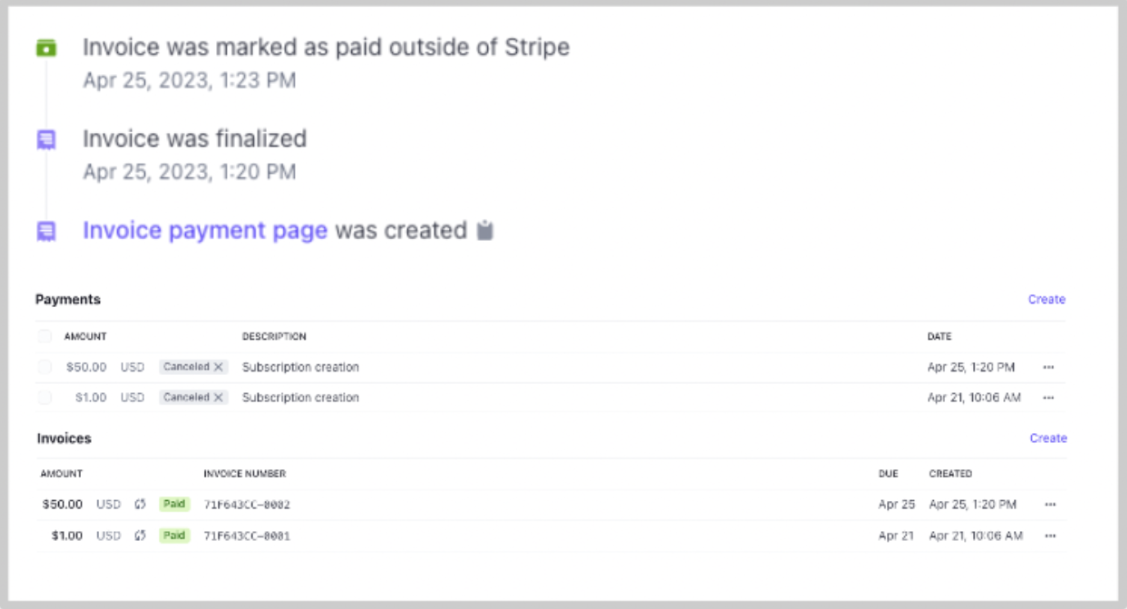 Within the memo of the invoice, you will see a note that this invoice will be paid via Loop Crypto The canceled payment you see is simply Stripe canceling its attempt to charge the payment method on file after it recognizes that a payment has been made outside of Stripe.
If you look at the invoice.paid event on the invoice record in Stripe, you will notice that the status of the invoice is Paid. The metadata within the invoice record will also be updated by Loop. This indicates to you that the invoice was paid by Loop.
Within the memo of the invoice, you will see a note that this invoice will be paid via Loop Crypto The canceled payment you see is simply Stripe canceling its attempt to charge the payment method on file after it recognizes that a payment has been made outside of Stripe.
If you look at the invoice.paid event on the invoice record in Stripe, you will notice that the status of the invoice is Paid. The metadata within the invoice record will also be updated by Loop. This indicates to you that the invoice was paid by Loop.

In cases of network latency or interruptions, is there a risk of duplicate payments being triggered?
Loop Crypto has a safety mechanism internally to prevent double payments. Our system can never try to process a payment for the same invoice number twice, so even if a particular chain is slow, we will not try the same payment twice. This is something you do not need to worry about handling on your end. Loop Crypto handles all on-chain interactions.
Are there specific failure scenarios that I should proactively handle?
Our failure rate is extremely low, too non-existent. This is because Loop will only process payments after we’ve checked the wallet’s balance and approval amount and confirmed they are both high enough to succeed on chain. In the rare chance that a transaction fails on chain, you will see “failed” as the transaction’s status. You can contact Loop in these situations, and we will help you troubleshoot.
How are funds settled?
Companies are able to settle in either crypto or fiat. For those wishing to settle in crypto, you will receive the crypto that your end customer pays you in. For example, if the customer pays in USDC, you will immediately see USDC hit your wallet after payment completes. For those wishing to settle in fiat, you complete a KYB screen, which then allows funds to be automatically settled in fiat. In this scenario, your customer would initiate payment in USDC, and you as the business would receive USD.
Customer and invoice management
How does Loop or Stripe handle duplicate payment scenarios?
Loop Crypto has a safety mechanism internally to prevent double payments. Our system can never try to process a payment for the same invoice number twice, so even if a particular chain is slow, we will not try the same payment twice. This is something you do not need to worry about handling on your end. Loop Crypto handles all on-chain interactions.
What does it mean for an invoice to be in Draft status?
On the Invoices page of the Company Dashboard, there is a tab called “Draft.” This Draft status exists because Stripe does not finalize the next invoice for a subscription until roughly the day before. That means that the invoice could potentially be modified up until the due date. Any modifications to the invoice are automatically pulled into Loop, and the invoice is updated. This Draft status simply denotes that the invoice details (amount, due date, etc.) may change as Stripe has not yet finalized the invoice. Once Stripe finalizes the invoice, the invoice moves to the Finalized tab.
How are taxes handled? Does Loop collect taxes as part of the payment?
The Loop checkout collects the final amount due, inclusive of taxes. It is your responsibility to set up tax calculations in Stripe. The final invoice amount, inclusive of tax, is then passed to Loop when the payment link is generated. Most companies will show the customer a final price on a screen before the customer heads to the payment link. You may also want to hide the cart on the Loop checkout if you are showing the breakdown beforehand (?cartEnabled=false).
Down the road, Loop is exploring being able to show the tax amount as a line item within the cart. You can also embed the Loop widget and design your own cart UI if desired.
If the customer record already exists in Stripe, how do I charge that customer with Loop Crypto?
When you create a checkout session (see the endpoint here), you can pass the Stripe customer ID into this parameter: externalCustomerId. The subscription and/or invoice created in the subsequent checkout will be tied to this customer.
Webhooks
What happens if a webhook event fails? Should I be concerned about this?
Loop Crypto monitors its systems and has built internal alerting systems to ensure any downtime is minimal and that any issues trigger immediate alerts. For additional redundancy to confirm when a payment occurs, you can listen to both Stripe’s invoice.paid event as well as Loop Crypto’s transferProcessed event. Both of these events are triggered when a payment occurs on chain. You can also always reference your company’s contract and the on-chain transaction history. We recommend that companies utilize webhooks rather than trying to repeatedly call the Loop API to gather the status of an invoice. You should not need to periodically poll Stripe from the backend as an additional verification method.
Is it possible to know which token the user paid with from the webhook data?
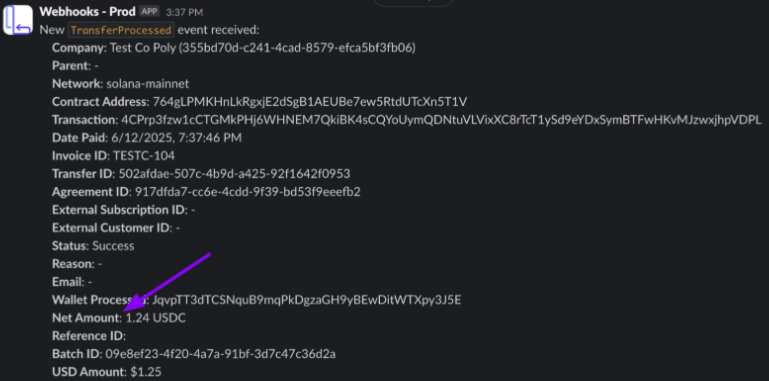
Loop Crypto’s transferProcessed event provides more details around the on-chain transaction. It provides the transaction hash, network, and net amount of the token sent. Within the net amount field, you can find the token that was sent for payment.
What webhook events are fired for subscription renewals?
When an invoice is finalized in Stripe and pulled into Loop Crypto, Loop emits a transferFinalized event (more details here). This means the final details of the invoice have been finalized, and Loop will now be able to collect on the invoice when the due date and time arrive.
When the invoice is due, the transferProcessed event (from Loop) will fire as well as the invoice.paid event (from Stripe) when the next payment is processed. The agreementSignedUp event only occurs once during that initial checkout. If they sign up on June 10th for a monthly plan, you would see the next invoice get paid automatically on July 10th when you’ll receive a transferProcessed event assuming the wallet has enough balance and allowance. The transferProcessed event will contact the transaction hash and the transfer ID. If the payment is missed, Loop emits a LatePayment webhook 10 minutes after the missed payment.
Separate from the webhooks, Loop also has an email reminder cadence for the end customer. There is a good example cadence in this page of the docs.
Emails and notifications
Are there reminder emails sent before payments are due?
Please refer to this page in our docs with reference to the payment reminder cadence and notifications.
What happens if a payment is missed? Do you send a notice?
If the allowance or balance was not high enough at the time of payment, the payment will not be facilitated. Instead, Loop will continue to monitor the allowance and balance over the default retry period (typically set at 7 days). If during that period, there is sufficient allowance and balance, the payment will proceed. If not, the subscription is canceled at the end of the retry period. Contact Loop if you want to modify the default retry period.
Will both Stripe and Loop send emails?
Stripe and Loop emails operate independently of each other. If you have invoice reminder and receipt emails set up in Stripe, those will continue to send for all customers, including those paying with Loop. Loop’s emails are specific to the crypto payment event. We send reminders for upcoming payments and will also send a notice if the allowance or balance for the payment is insufficient, causing a late payment. Loop also sends receipt emails, which include the transaction hash for customers’ records.
Will customers get receipts from Loop?
If you opt to enable Loop Crypto emails, customers will receive receipts after payment is completed. Please refer to this page for more details and an example of the receipt.
Payment links
What is a checkout session? How does it differ from a payment link?
A payment link is a Loop-hosted payment page that allows a customer to purchase one or many products, start a subscriptions or pay an invoice. Your customers click a button on your site and get redirected to a payment page hosted by Loop. Payment links are designed to be a customizable and reduce your development time. To create a payment link, merchants define the Stripe products (using Stripe’s price-ids) they would like the customer to see and purchase. Payment links can be created with no-code by using the company dashboard or by calling the Checkout Sessions Endpoint.
What are general purpose links and one-time links?
Payment links can either be general-purpose links that are reusable and not tied to a specific customer, subscription or invoice or one-time links that once consumed they become inactive. General purpose links are created using the parameter template: true.
Each time a customer clicks on a general purpose link, a new one-time payment link is created with a unique id. This link represents a specific customer’s payment session and once a payment confirms with that link, it will become inactive.
Typically, when a new subscription is created, the invoice is not finalized until an hour later in Stripe, and then Stripe actually processes the payment at midnight. Using this parameter prompts Stripe to finalize the invoice now and prompts Loop to immediately collect on the finalized invoice. This parameter is typically used for upgrades where you want to immediately charge a customer after upgrading them to a higher tier.
Do you support dynamic redirect URLs after checkout?
When you create a checkout session, there is a parameter enabling dynamic redirects post checkout. It is called successUrl. You can pass in a URL that is specific to a given checkout session, so it is unique for each customer. We have a video showing how to set up a redirect URL on this page.
Is it possible to create two separate Loop checkout links for each of my two websites? These websites both use the same Stripe account.
Yes, so you would just need to have two different products created in Stripe. Each one of those would then have a different checkout link where you can set a custom redirect URL.
Subscription management
How do subscriptions work? Are payments automatically pulled at each payment date?
The next payment will happen automatically as long as the wallet has enough balance and allowance. For example, let’s say the customer signed up for a $100 a month subscription. The checkout will default to having them set an allowance of $1,300. Each month, that $1,300 allowance gets spent down, and if it gets too low (below $100), Loop will prompt the customer via email to increase the allowance again. You can modify this default. In addition to the allowance, the balance has to be high enough as well, but the balance only needs to be higher than $100 each month on the payment due date for the payment to process. It’s very similar to how an ACH pull works.
What if a customer does not have enough funds or allowance?
One of the great benefits of crypto payments is that there is visibility into whether a transaction will succeed before it happens. If a wallet does not have a sufficient balance and/or the allowance is too low to cover the payment, the transaction will simply not be processed. To help prevent missed transactions, Loop sends an email update if an upcoming payment needs attention.
On the Stripe side, you will see the invoice for that particular customer remain open until the customer adjusts their allowance and/or tops up their wallet. Additionally, companies can subscribe to Loop’s missed payment webhook.
Is there a portal where customers can manage or view the subscription?
Yes, customers can use the Customer Portal. You can also use Loop’s endpoints and components to allow customers to manage their subscriptions within your own dashboard.
Does the user need to log into the portal with the wallet they paid with?
Yes. The user needs to log in with the wallet they paid with in order to see their historical transactions and manage upcoming payments.
How can customers increase their payment allowance?
Customers can visit the Loop Customer Portal to manage their allowances and payment settings.
Upgrades and downgrades of a subscription
How do upgrades and downgrades work?
The integration enables upgrades and downgrades. Please refer to this section in our documentation for instructions.
Is it possible to upgrade from a free plan?
Yes, you can allow a customer to upgrade from a fee plan. Please refer to this page in our documentation.
What happens if a crypto payment fails after a subscription upgrade?
Loop will only process payments it has high confidence will succeed. In the rare case that a transaction does fail, Loop will roll back the upgrade in Stripe.
Other topics
Can customers switch from Loop-managed payments back to fiat (e.g., switch to credit card)?
Yes, there is a disconnect endpoint in the APIs that allows customers to switch from crypto payments back to traditional fiat payments.
To switch from Loop to a credit card in Stripe, we have an endpoint you can call: Disconnect agreement from Stripe. You can pass in the Stripe sub-id to the call and Loop will disconnect Loop that subscription and stop collecting payments. You will then need to set Stripe to charge the credit card within Stripe.
Regarding the draft status, this is handled by Stripe. Loop only charges for finalized invoices in Stripe. Stripe will finalize an invoice typically 12-hours before the due date or 1 hour in the case of an upgrade. If your invoicing isn’t finalizing in Stripe, it’s likely the case that the subscription has some parameter in it that is setting Stripe to keep it in draft. Do you have the sub-id and your entity-id? I can look into it for you and provide a detailed explanation.
How do I request that Loop Crypto added a new blockchain network?
Email us at hello@loopcrypto.xyz about any new networks you need support for.
Should I use idempotency_key with Loop?
This is a tool Stripe utilizes to prevent duplicate payments when it comes to retrying a fiat payment method like card or ACH. This won’t be relevant for Loop. We have our own internal retry mechanism to ensure we never retry a payment for the same invoice. We have a “cool off” period built in to ensure we never retry something while another transaction is already in flight on chain. We haven’t had any other teams need to or try to use idempotency_key with Loop.
