

Overview
Below, we have provided steps on how todisconnect (i.e., remove) a customer from paying via Loop.
Upong disconnecting the Stripe subscription from Loop as a payment method
- The subscription will remain active in Stripe
- All open invoices in Loop will cancel (we will not cancel anything in Stripe)
- Delete all draft invoices in Loop
- Prevent any future emails from being sent by Loop
disconnected or canceled (i.e., you should have no active subscriptions in Loop)
Steps to disconnect a customer
There are several ways you can disconnect a customer.Method 1: Update the customer’s payment method on Stripe’s dashboard
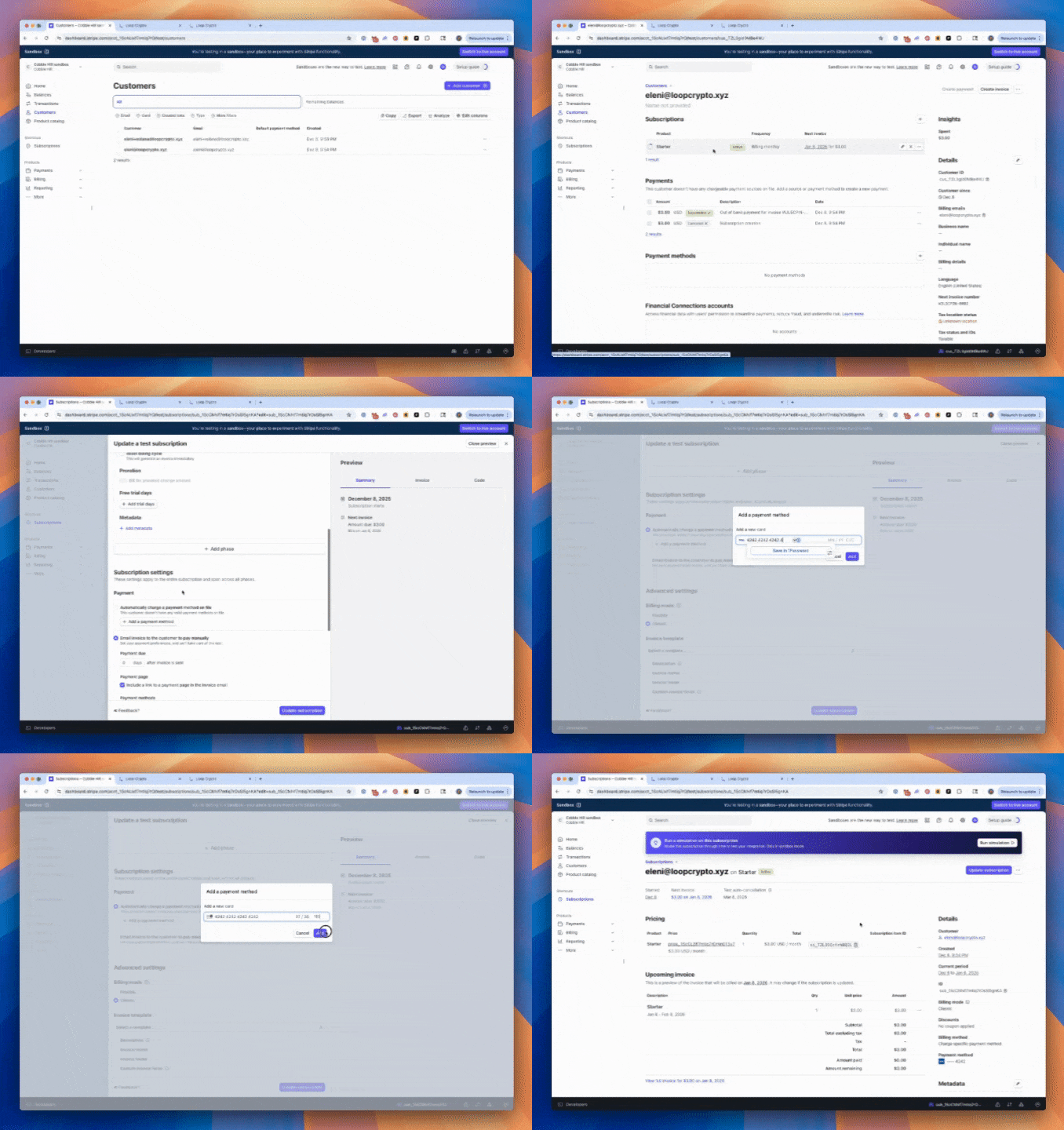
- Log in to your Stripe account, go to the “Customers” tab
- Click on the customer you want to update
- Click on the subscription you want to modify the payment method
- Click “Update subscription” in the top right corner of the page
- Scroll down to the “Subscription settings” section, and update it to “Automatically charge a payment method on file”
- Click “Add a payment method,” enter the details, and click “Save”
- Click “Update subscription” to apply the changes
- A pop-up window will appear, set the update to “Immediately”
Method 2: Provide the customer with Stripe payment update link
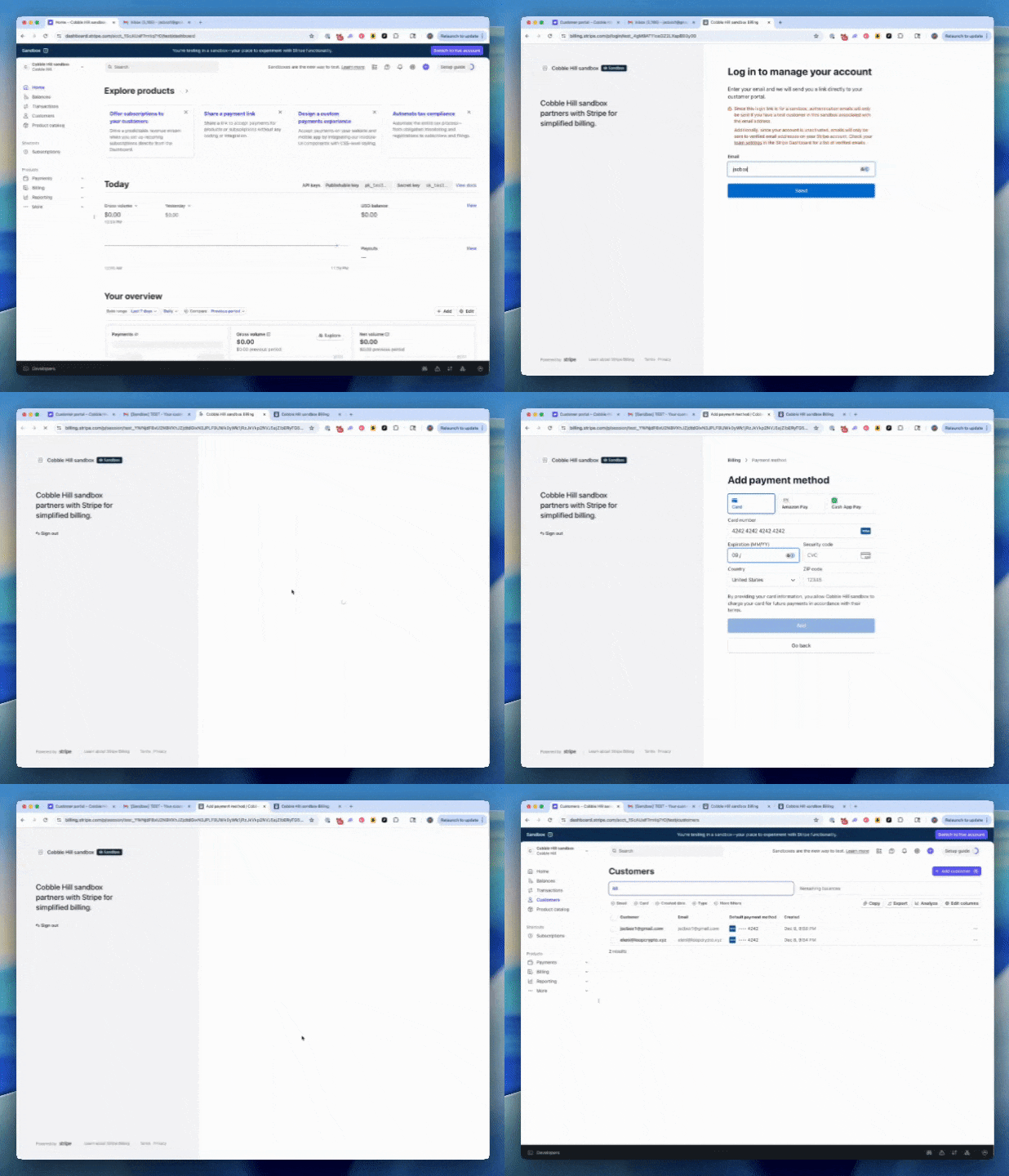
- On the Stripe Dashboard, navigate to the gear icon in the top right corner and selectSettings > Billing > Customer portal
- Create a portal link. Your customer will authenticate with their email address that is in Stripe.
- Once authenticated, they will be able to add a new payment method to Stripe.
Method 3: Direct customer to update their payment method on Loop’s Customer Portal
- Direct your customer to my.loopcrypto.xyz
- The customer will need to connect the wallet they currently use at their payment method
- On Loop’s Customer Portal a link will be available to redirect the payer to Stripe’s Customer Portal where they can add another payment method.
Method 4: Disconnect the customer from Loop without having to add a new payment method in Stripe
- Use the “Disconnect agreement from Stripe” endpoint to switch a customer off of Loop as a payment method. You can provide either the Stripe
sub-id(recommended) or Loop’sagreement-id.
FAQs
How do I know if a customer is paying through Loop?
How do I know if a customer is paying through Loop?
How do I confirm if a customer has successfully disconnected from Loop?
How do I confirm if a customer has successfully disconnected from Loop?
How do I contact Loop to close my account?
How do I contact Loop to close my account?
How do I get my CSV download of all historical transactions?
How do I get my CSV download of all historical transactions?
Can the customer change their payment method themselves?
Can the customer change their payment method themselves?
What if the customer has an open/past due invoice when a subscription is disconnected?
What if the customer has an open/past due invoice when a subscription is disconnected?
Will webhooks be sent?
Will webhooks be sent?
Will emails be sent?
Will emails be sent?
Can Loop disconnect all my customers at once?
Can Loop disconnect all my customers at once?
How does a payer remove approval or authorization from Loop?
How does a payer remove approval or authorization from Loop?
Will Loop continue processing payments?
Will Loop continue processing payments?
How do I retrieve a list of all Loop-connected customers programmatically?
How do I retrieve a list of all Loop-connected customers programmatically?
What happens to recurring payments after a customer disconnects?
What happens to recurring payments after a customer disconnects?
Will Stripe subscriptions be cancelled when disconnected from Loop?
Will Stripe subscriptions be cancelled when disconnected from Loop?
How should I communicate the payment method change to my customers?
How should I communicate the payment method change to my customers?
Can I test the disconnection process with a single customer first?
Can I test the disconnection process with a single customer first?
What you should see after a customer has moved from Loop to another payment method
What you should see after a customer has moved from Loop to another payment method